
Menu
Close
  • Why PDF Solutions
  • Products
    • Exensio® Analytics Platform
      • Exensio Battery
    • Sapience™
    • Advanced Insights for Manufacturing
    • Design-for-Inspection™ System
    • Characterization Vehicle® System
    • secureWISE®
    • Cimetrix® Connectivity & Control
    • Industry Standards
    • Technology
    • Partners
  • Services
    • Overview
    • Integrated Yield Ramp
    • Professional Services
    • Value Added Services
  • Resources
    • All Resources
    • Press Releases
    • Blog
    • Users Conferences
    • Keynotes & Papers
    • White Papers & eBooks
    • News
    • Events
    • Webinars
    • Videos
    • Applications
    • Training
  • Company
    • Overview
    • Management Team
    • Board of Directors
    • Corporate Governance
    • Careers
    • Investor Relations
    • Locations
    • Trust Center
  • Support
    • Overview
    • Support Portal
    • Software Downloads
  • Contact
  • Schedule A Demo
  • Login
  • Support
    • Overview
    • Support Portal
    • Software Downloads
  • Contact
  • Schedule A Demo
Login below to view protected resources.

Lost your password?
Forgotten Password
Cancel
  • Why PDF Solutions
  • Products
    • Exensio® Analytics Platform
      • Exensio Battery
    • Sapience™
    • Advanced Insights for Manufacturing
    • Design-for-Inspection™ System
    • Characterization Vehicle® System
    • secureWISE®
    • Cimetrix® Connectivity & Control
    • Industry Standards
    • Technology
    • Partners
  • Services
    • Overview
    • Integrated Yield Ramp
    • Professional Services
    • Value Added Services
  • Resources
    • All Resources
    • Press Releases
    • Blog
    • Users Conferences
    • Keynotes & Papers
    • White Papers & eBooks
    • News
    • Events
    • Webinars
    • Videos
    • Applications
    • Training
  • Company
    • Overview
    • Management Team
    • Board of Directors
    • Corporate Governance
    • Careers
    • Investor Relations
    • Locations
    • Trust Center
Blog

How to Dynamically Generate ECVs in a CIMControlFramework Implementation

Categories: 
Industry Trends
,
Equipment Solutions
,
Industry Standards

Tags: 
Subject Matter Experts
,
Smart Manufacturing/Industry 4.0
,
Equipment Control
,
SEMI Standards

Posted on August 23, 2023 by Anderson Kim

This blog was originally posted on cimetrix.com

Introduction

This blog explains an approach that Cimetrix® CIMControlFramework (CCF) developers can use to dynamically generate ECVs (EquipmentConstant Variables) in source code as a convenient, effective alternative to including them in the default configuration file.

When implementing the GEM interface for equipment, it is often necessary to define EquipmentConstant Variables (ECVs). If the GEM interface is part of a CCF-based equipment control system, you would normally define the ECVs in the Equipment.epj file. However, registering the ECVs with this approach can take a lot of effort in a number of situations. Among them:

  • When you need to register hundreds or even thousands of ECVs;
  • When you need to dynamically register ECVs based on the specific configuration of an instance of the equipment;
  • When you want to register ECVs without changing the EPJ file.

In these cases, dynamically generating the ECVs from the source code easily addresses these challenges.

The rest of this posting briefly shows you how to accomplish this, and how to change and monitor the values of ECVs.

How to generate ECVs programmatically

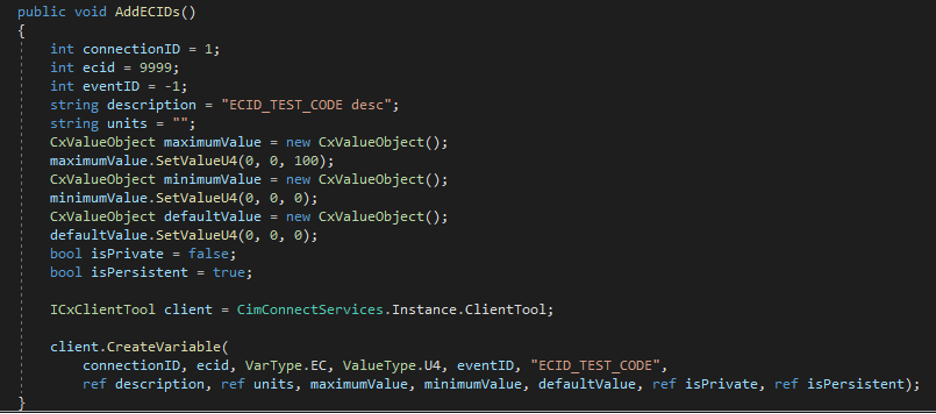
After calling ecs.Start() inside Supervisor’s Run(), the code sample below generates an ECV.

What you need to be most careful about here is that the ecid and ECV’s name should not be duplicated with other VIDs.
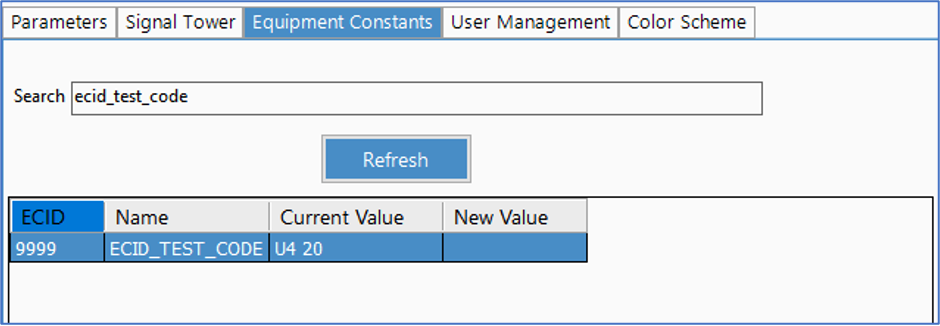
Then you can see the newly generated ECV  in the Equipment Constants screen of the OperatorInterface.
How to change the value of an ECV

The ECV’s value can be updated through FactoryAutomationServer using the code below.
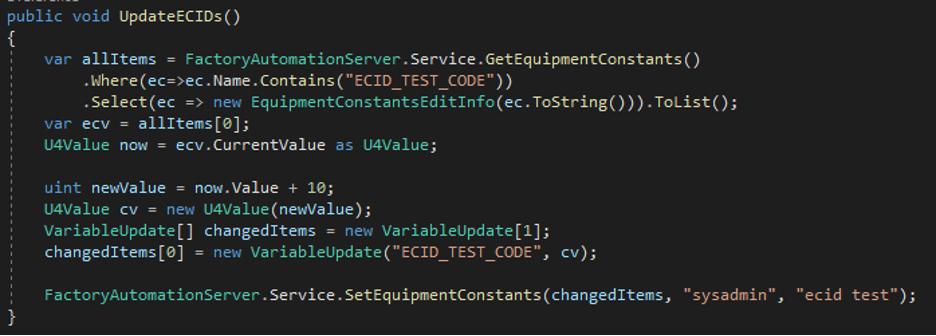
You can then see a message that the ECV’s value has been changed.

How to detect the ECV’s value change

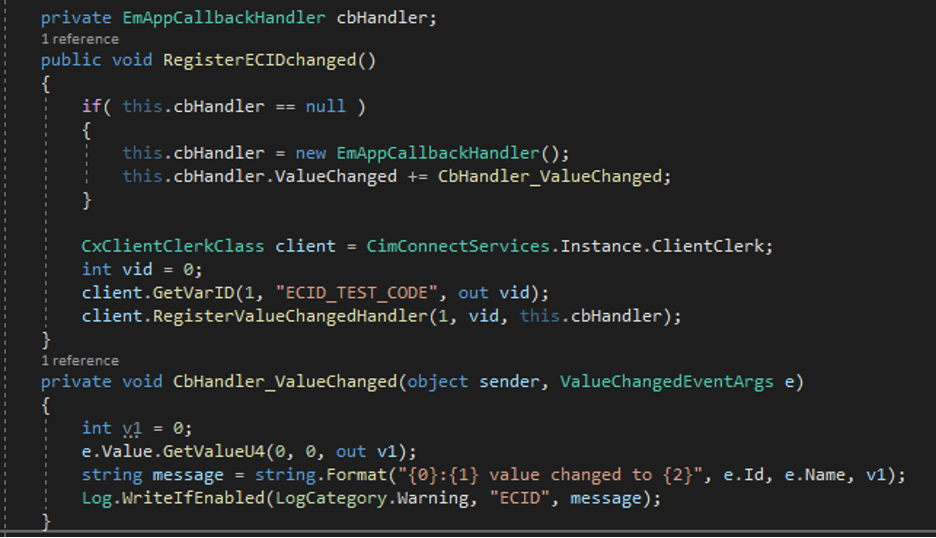
If you want to detect changes to the ECV’s value, you can receive a callback by registering ValueChangedHandler as shown in the code sample below.

To Summarize:

  • You can dynamically generate an ECV by calling CreateVariable of CIMConnect;
  • You can change the value of an ECV by calling SetEquipmentConstants of FactoryAutomationServer;
  • You can detect changes in the value of the ECV by calling RegisterValueChangeHandler of CIMConnect.

All are helpful solutions for CCF developers who need to generate ECVs dynamically.

Share on:
  • Facebook
  • Twitter
  • LinkedIn
« Cimetrix CIMControl Framework GEM Interface Custom Message Handling
How to Configure External Storage for Cimetrix CIMConnect Logging »

More From Author

  • How to customize CCF for LoadPort without Carrier ID reader

Categories

  • Data, Analytics, and AI
  • Events
  • Industry Trends
  • Subject Matter Experts
  • Equipment Solutions
  • Manufacturing Integration
  • Partners
  • Industry Standards
  • Company Insights
  • Podcast

Tags

  • Subject Matter Experts
  • Smart Manufacturing/Industry 4.0
  • Equipment Control
  • SEMI Standards

Ready to get Started with PDF Solutions?

Learn how we can transform your manufacturing data into actionable intelligence and improve your product yield, quality, and reliability

Schedule A Demo Contact Us

Corporate Headquarters
2858 De La Cruz Blvd.
Santa Clara, CA 95050 USA

Phone: 408-280-7900

Fax: 408-280-7900

Follow Us on Social Media

  • Facebook
  • Twitter
  • LinkedIn
  • Instagram

© 2026 PDF Solutions. All rights reserved.

  • Privacy Policy
  • Terms of Service
  • 日本語
  • 한국어
  • 中文 (简体)
  • 中文 (繁體)