[gtranslate]

CIMConnect Control Panel

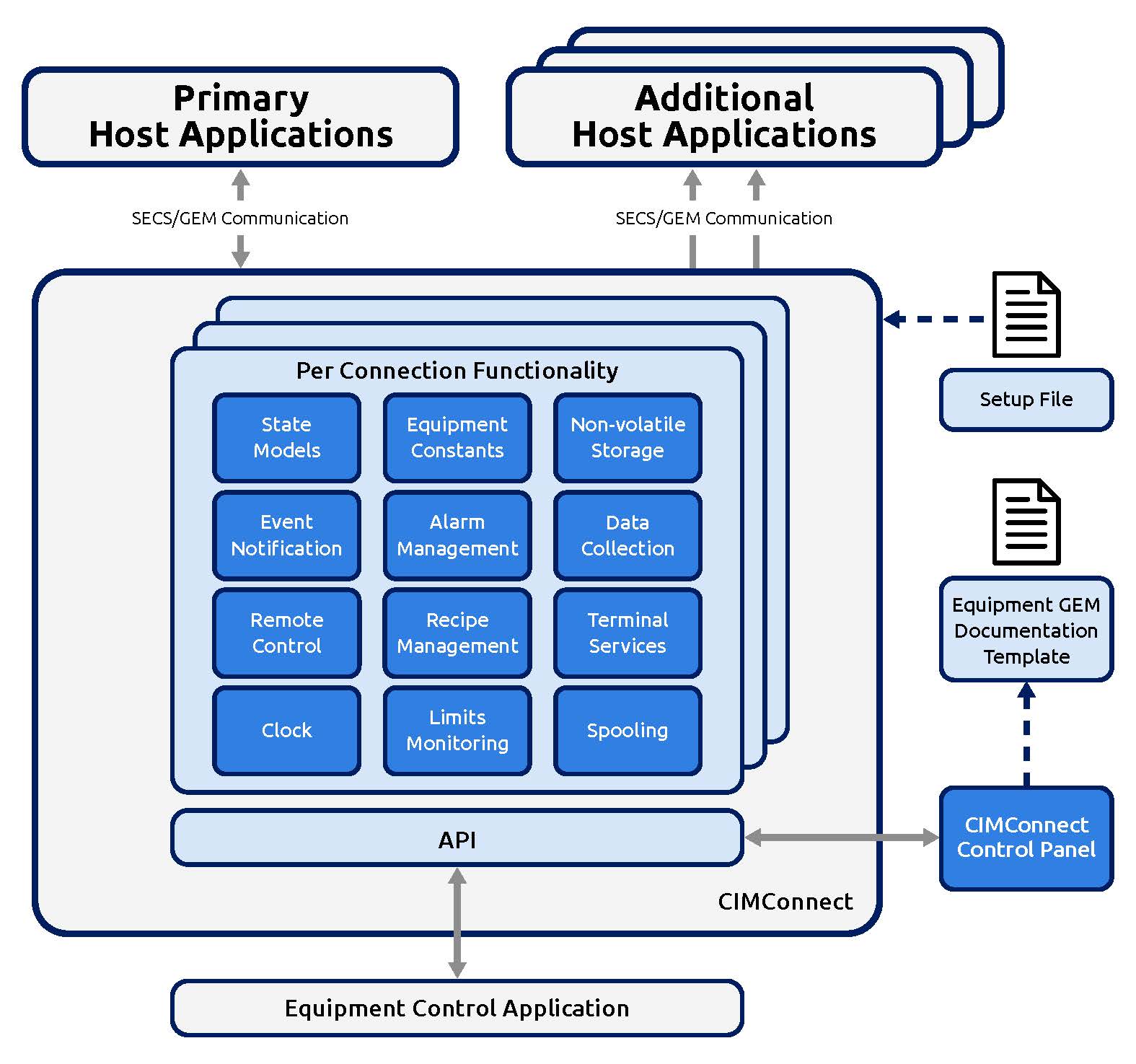
Real-time insights into the GEM interface for comprehensive diagnostics, testing, and simulation. Monitor SECS-II message activity, alarms, and events directly within the control panel.

Multiple-Host Support

Connect multiple GEM host applications effortlessly. Enable secondary hosts for diagnostics and interface validation without interrupting factory operations.

Sample Applications in Multiple Programming Languages

Accelerate your development process with pre-built, functional sample applications in languages such as C#, VB.NET, and C++. These samples provide a robust foundation for implementing GEM.

Proven and Trusted

CIMConnect has been implemented on nearly every equipment type across the globe. Its maturity ensures compliance with SEMI standards, robust performance, and unparalleled reliability in manufacturing environments.

Future-Forward Standards Support

Stay ahead of compliance needs with support for the latest SEMI standards, including SECS-I, SECS-II, HSMS, E173 (SMN), PV2, HB4, and PCBECI.

Specifications

  • Supported Standards:
  • Development Languages: Compatible with VB.NET , C++, C#, and others
  • Supports Windows 10 and later

Support

Cimetrix is committed to supporting your project from start to finish. Our goal is to empower you to control your own development process. We offer comprehensive product training to get your team up to speed quickly. Additionally, our engineering personnel are available to assist with project planning, design, and initial deployment.

CIMConnect FAQs

What are the benefits of CIMConnect's dynamic configuration capabililty?

Tool suppliers often need to support multiple equiipment types across their customer base. Dynamic Configuration enables this with minimal redunda ncy of integration code and effort.

How do CIMConnect stakeholders use the control panel?
  • Interface developers use the control panel to configure and monitor all aspects of a particular CIMConnect implementation to ensure it meets the customers requirements.
  • Support staff use the control panel to understand CIMConnect’s detailed behavior and find root causes of potential problems. In particular, the control panel allows users to observe the actual message traffic between the equipment and the factory host.
Can I connect multiple host systems to one CIMConnect instance?

Yes, CIMConnect can support secondary hosts for diagnostics without interrupting production. Secondary hosts are typically read-only interfaces to avoid creating multiple points of control.

Does CIMConnect include tools for testing and diagnostics, or do I need something separate?

CIMConnect does include sample application to show how it works in a complete equipment context. In addition, our EquipmentTest product provides a rich set of diagnostic tools, including custom script capability.

How long has CIMConnect been in production use?

CIMConnect has been implemented on nearly every equipment type globally for over 25 years, and is continuously updated to support the latest GEM standards.